1. Analytics at a Glance
Semiconductor mass production STDF V4 datalogs record thousands of parametric tests (PTR, MPR) and hundreds of thousands of parts (PRR). Simply knowing that parts passed within specification limits (LL/HL) does not reveal whether the manufacturing process is stable, whether measurements can be trusted, or whether potentially hazardous outlier parts are lurking among the good units.
DLOG provides specialized analytics screens to answer these crucial questions. Accessible from the view selector at the top of the interface, this guide explains the views dedicated to process capability, outlier screening, and measurement reliability.
 Click to enlarge
| Analysis | DLOG Screen | Key Metrics | When to Use |
|---|---|---|---|
| PAT+ Outlier Screening | Wafer (PAT Data / PAT+), Chart (DPAT bands) | DPAT bands, SPAT neighbor residuals, PAT+ Flips | Screen "suspicious parts among good dies" that pass spec limits but deviate from the distribution or neighborhood. |
| Multivariate Outliers | MVA Explorer, Wafer (MVA-PAT) | Mahalanobis MD², PCA SPE, Isolation Forest | Detect parts whose individual tests are within spec, but whose combination of values is abnormal. |
| Gauge R&R | Gauge R&R | EV, AV, PV, %GRR, %P/T, ndc | Evaluate measurement system repeatability and reproducibility using repeated test runs of the same wafer. |
| Site Delta | SITE, Group Analysis (Group by: Site) | Per-site yield, BINs, means, η², ANOVA | Identify whether a single probe card pin, socket contact, or channel is causing systematic deviation. |
| Process Capability | Chart, Dashboard, Group Analysis | Cpk, Cp, Est ppm, Normality (Anderson-Darling) | Quantify spec margin, estimate ppm defect rates, and verify if normal distribution assumptions hold. |
| Correlation & TTO | Correlation, TTO Engine | Pearson r, Spearman ρ, Redundant test candidates | Identify duplicate tests measuring the same physical behavior to explore test time reduction. |
Means and standard deviations are computed in a single pass using the Welford online algorithm. This numerically stable formulation avoids catastrophic cancellation that can occur when naively accumulating sums of squares:
2. PAT+ Outlier Screening (DPAT · SPAT)
PAT (Part Average Testing) is defined in the automotive semiconductor quality guideline AEC-Q001. Its purpose is to filter out parts that pass standard specification limits but fall outside the normal distribution of the population, thereby reducing early-life failures (infant mortality) in the field.
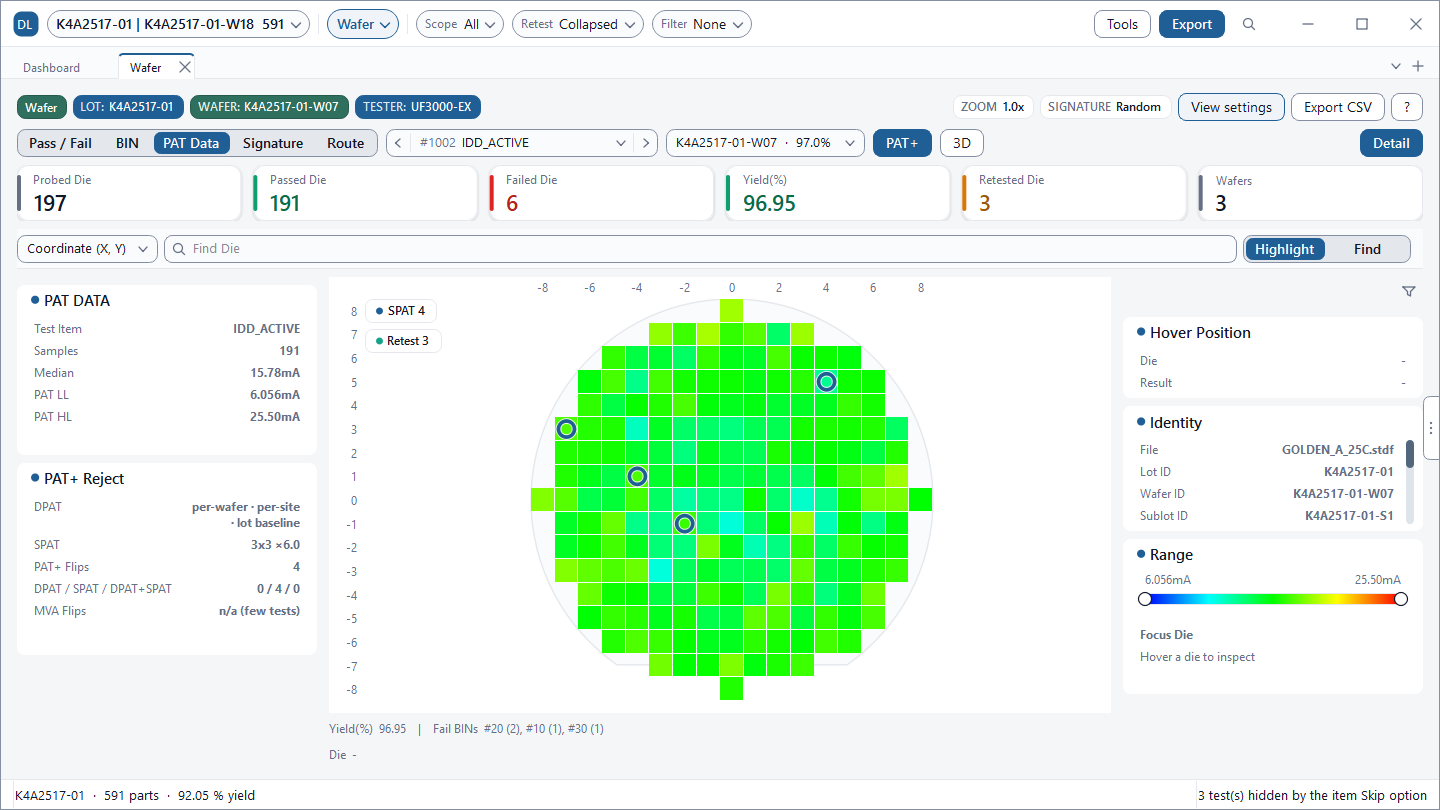
In the Wafer screen's PAT Data mode, DLOG computes and displays PAT limits (PAT LL / HL) for the selected test. When you enable PAT+ in the view settings, dies that passed test specs but are flagged as suspicious by DPAT or SPAT rules are highlighted as an overlay on the wafer map. The original test PASS/FAIL verdict is preserved.
 Click to enlarge
 Click to enlarge
DPAT: Robust Dynamic Limits Recomputed from Data
To prevent extreme outliers from biasing the sample mean and standard deviation, DLOG uses the median instead of the mean, and a robust sigma estimated from the interquartile range (IQR):
Dies lying outside this range are flagged as outlier candidates. The default sigma multiplier k is 6. You can configure upper and lower multipliers independently via View settings > Wafer View Options > Lower Sigma (L) / Upper Sigma (H). Smaller values of k capture more candidates.
DPAT (Dynamic PAT) dynamically re-evaluates these limits per wafer, per site, or per lot baseline rather than using static limits. Site-specific DPAT eliminates tester hardware offsets, while lot-baseline DPAT tracks inter-wafer thermal and process drift. In the Chart screen's Trend view, you can overlay the same dynamic limits using the DPAT (trend) option.
SPAT: Spatial Neighbor Residuals
Localized anomalies—such as edge clusters, scratches, or pinpoint defect clusters—may blend into the broader wafer distribution and go unnoticed without spatial context. SPAT (Spatial PAT) evaluates the residual between target die $(i, j)$ and the median of neighboring PASS dies against the neighborhood robust sigma:
The default spatial kernel is $3 \times 3$ with a multiplier of 6.0. Near wafer boundaries or dense defect regions where valid PASS neighbors are scarce, DLOG automatically expands the kernel outward by up to 2 concentric rings until the minimum neighbor threshold is satisfied.
Choosing PAT Sigma: Yield Loss vs Quality Risk
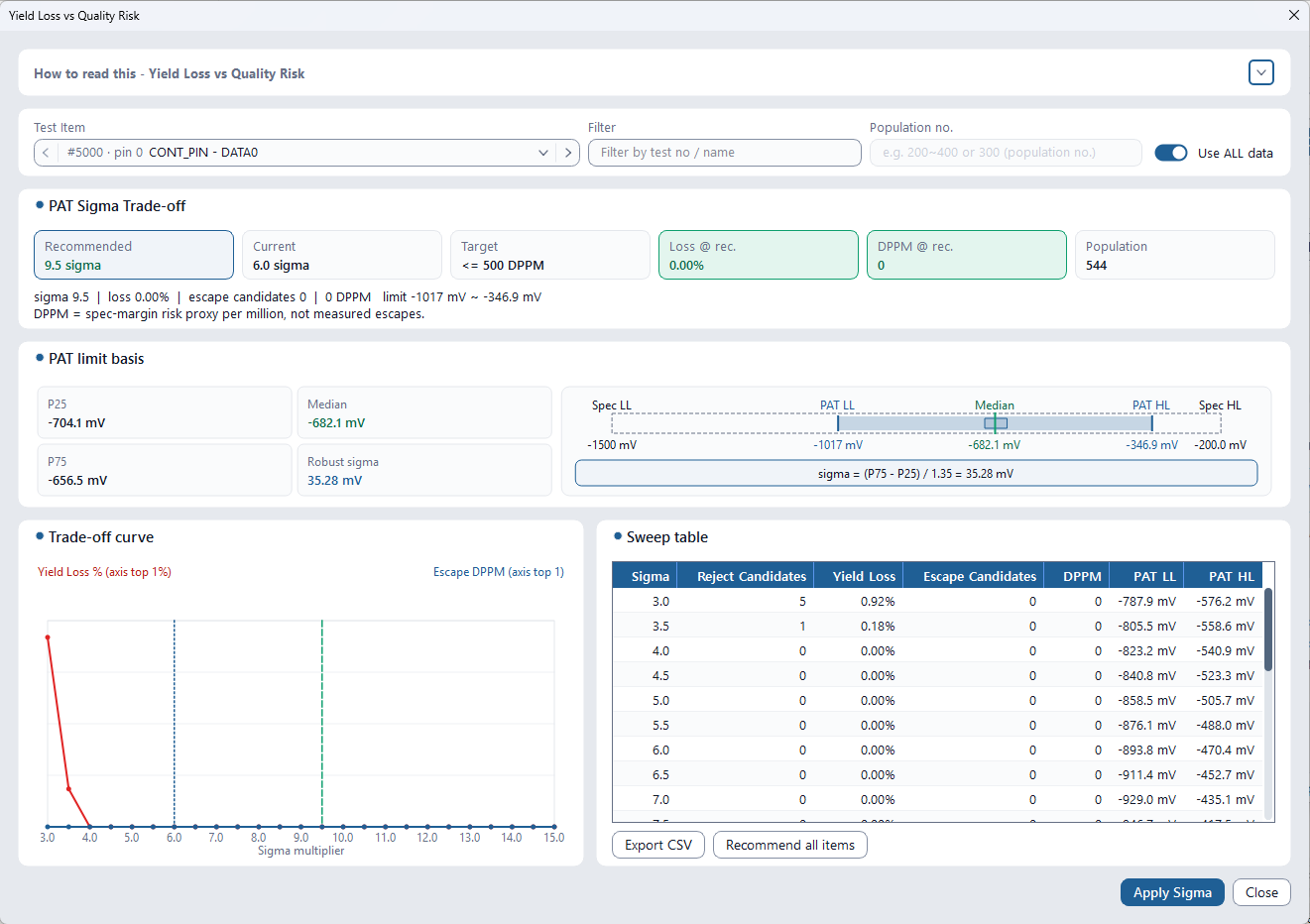
Tightening k catches more questionable dies, but increases overkill (yield loss) by sacrificing good silicon. Tools > Studies > Yield Loss vs Quality Risk sweeps sigma values across tests to plot Reject Candidates, Yield Loss, and DPPM curves, recommending an optimal sigma balance to meet your target DPPM. Click Apply Sigma to immediately apply it.
3. MVA Explorer (Multivariate Outliers)
Related parametric tests tend to vary together. A die might look perfectly normal when evaluating Test A and Test B individually, but if Test A is unusually high while Test B is unusually low, the pairing breaks normal physical correlation. While it passes individual scalar limits, it is an obvious multivariate outlier. The MVA Explorer detects these multi-dimensional anomalies.
 Click to enlarge
Three Outlier Detection Algorithms
| Algorithm | How It Detects Outliers | Best Used When |
|---|---|---|
| Mahalanobis (MD²) | Statistical distance taking full covariance into account. Flags parts exceeding chi-square distribution thresholds. | Recommended general-purpose default |
| PCA reconstruction (SPE) | Flags parts with high reconstruction error (Q-statistic) when projected onto principal components. Captures breakdowns in normal correlation patterns. | Recommended for large test suites |
| Isolation Forest | Tree-based partition algorithm with no parametric distribution assumptions. Identifies easily isolatable parts, ranking the top ~1% of PASS parts as outliers. | Captures non-linear, complex multi-modal anomalies |
Mahalanobis Distance (MD²)
Euclidean distance fails to account for scale differences and correlation among parameters. Mahalanobis distance resolves this by weighting deviations with the inverse of the covariance matrix ($\mathbf{\Sigma}$). DLOG computes a robust centroid and shrinkage covariance matrix, decomposing each test's contribution as $z_i \cdot (\mathbf{\Sigma}^{-1}\mathbf{z})_i$ such that the sum equals $MD^2$:
The Threshold (Sigma) setting (3.0 / 4.0 / 5.0 / 6.0σ, default 6.0σ) is converted to a two-sided normal probability $\alpha$, which sets the critical chi-square threshold for $r$ degrees of freedom (number of selected tests). Higher sigma settings yield fewer, more severe outliers. For PCA, SPE (Squared Prediction Error, Q-statistic) scores parts based on residual variance unexplained by the principal components.
Reading the Results Table
| Column | Meaning |
|---|---|
| Status | OUTLIER · NORMAL · NOT SCORED (missing test values among selected tests) · EXCLUDED (non-PASS parts) |
| Score | Outlier score from the selected algorithm (MD², SPE, or Isolation Forest score) |
| Risk | Score ÷ Threshold. Exceeding 1.0x classifies the part as an OUTLIER |
| Top contributor | Parametric test driving the score highest, along with its robust z-score (based on median and MAD) |
max(50, 5 × number of tests) (e.g., in Figure 3, 15 tests require at least 75 parts). Select physically correlated parametric tests; including unrelated tests dilutes anomaly scores. In the Wafer screen's MVA-PAT mode, you can inspect spatial scores by die coordinate and export parts flipped from PASS to MVA Outliers (MVA Flips) to CSV.
4. Gauge R&R Measurement System Analysis
Observed measurement variance consists of actual product variation combined with fluctuation introduced by the test system (tester instrumentation, probe card, socket contact, interface hardware):
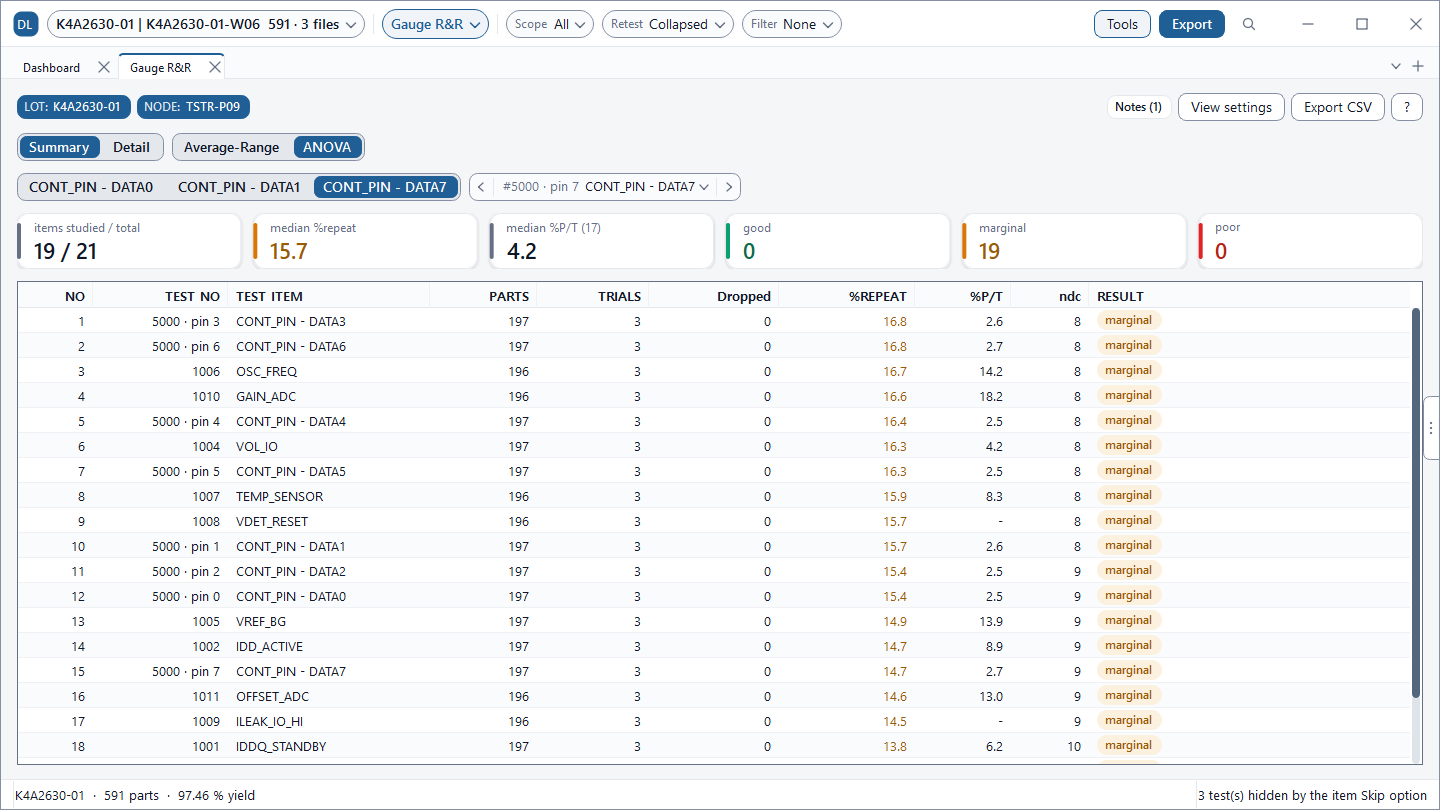
Excessive measurement noise risks falsely rejecting good product or shipping defective units. The Gauge R&R screen decomposes this total variance using repeated test runs of the same wafer. By matching dies on (X, Y) coordinates, DLOG treats repeat runs as valid trials even if Lot or Wafer IDs differ between files.
 Click to enlarge
Variance Components and Methods
| Component | Description |
|---|---|
| EV (Repeatability) Equipment Variation | Fluctuation when measuring the same part repeatedly under identical conditions (tester baseline noise). |
| AV (Reproducibility) Appraiser Variation | Variation across different operators, files, or test sites (socket contact variation, thermal shifts). |
| GRR | $\sqrt{EV^2 + AV^2}$ — Total variation introduced by the measurement system. |
| PV | True part-to-part manufacturing variation across the wafer. |
DLOG supports two computation methods: ANOVA (default, estimates variance components from Mean Squares) and Average-Range (classical AIAG worksheet method utilizing range and $d_2$ factors). ANOVA provides superior stability for large sample sizes. Two analysis modes are available: Repeatability Only (single site, AV is omitted) and Cross-Site (evaluates test sites as appraisers when all sites measure every die).
%GRR Criteria and ndc
| %GRR | Verdict | Interpretation |
|---|---|---|
| < 10% | good | Measurement system is capable. If ndc ≥ 5, resolution is also sufficient. |
| 10% to 30% | marginal | May be acceptable based on application importance, component cost, or repair expense. |
| > 30% | poor | Measurement error dominates decisions. Inspect probe contact, socket wear, and DIB noise. |
5. Multi-Site Hardware Delta Analysis
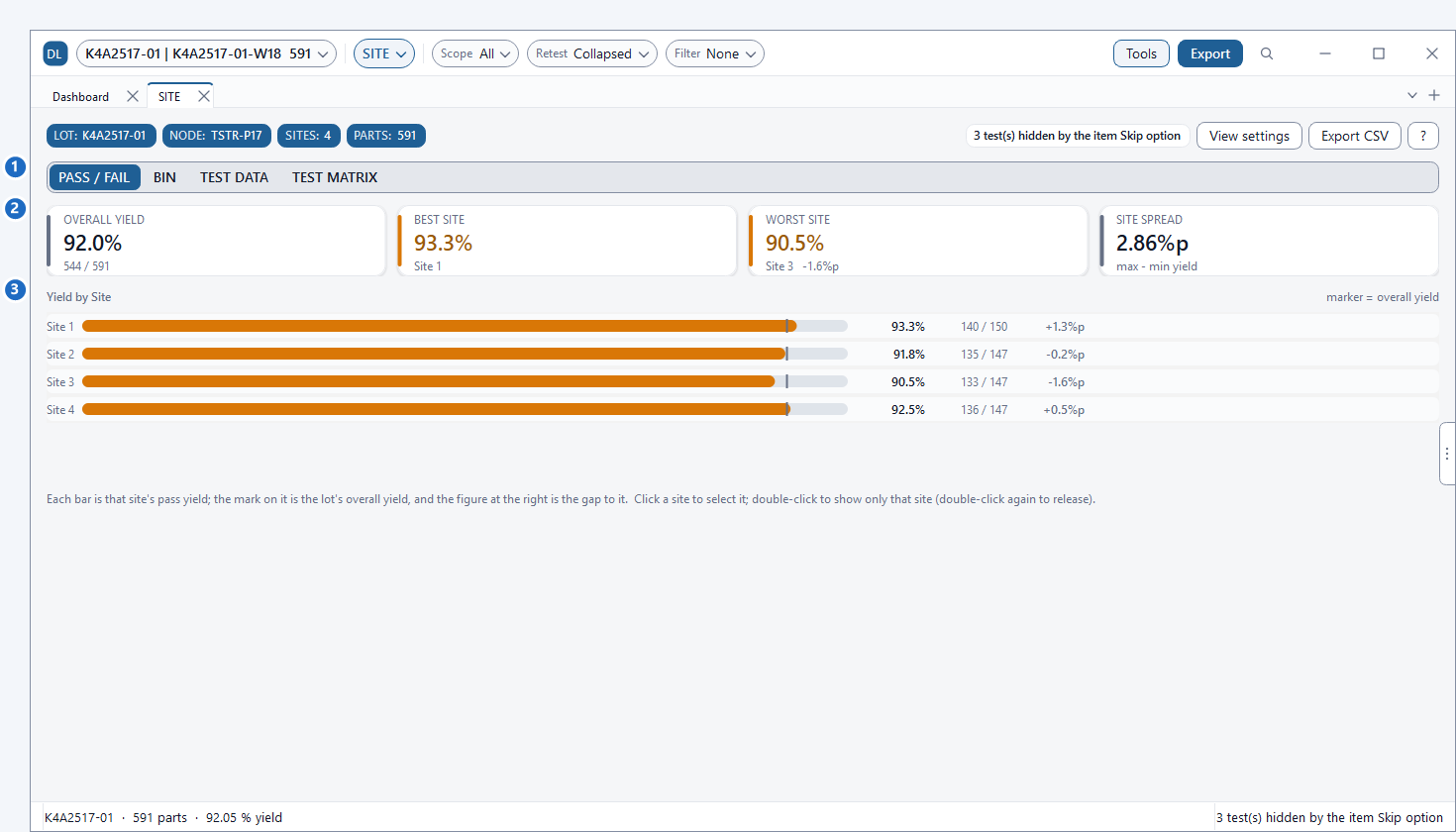
In multi-site parallel testing, disparities in probe needle scrub, socket contact resistance, or relay pin wear frequently cause one specific site to systematically drift. The SITE screen compares yield, BIN composition, and parameter averages across sites to instantly identify hardware outliers.
 Click to enlarge
| Check Item | Screen | How to Inspect |
|---|---|---|
| Low yield site | SITE > PASS / FAIL | Shortest bar; highlighted in the WORST SITE card. |
| Defect concentration | SITE > BIN | Examine if specific Fail BINs concentrate on a single site. |
| Parametric shift | SITE > TEST DATA | Check site-specific PASS die mean deviation against overall mean (Δ vs overall). |
| Site-dominant tests | SITE > TEST MATRIX | η² (proportion of total variance explained by site differences). Below 5% indicates minimal site impact, displayed as -. |
| Statistical significance | Group Analysis (Group by: Site) | One-way ANOVA p-value and Tukey HSD pairwise contrasts. |
| Site reproducibility | Gauge R&R (Cross-Site) | Treat sites as appraisers when measuring identical dies to evaluate AV. |
6. Cpk · Cp · Est ppm · Normality
Process capability indices quantify how well parameter distributions fit within specification limits (LL/HL). DLOG displays Cpk and Cp in the Chart screen's Test Item Statistics, the Tests (Cpk) sidebar list, and the Dashboard capability summary.
Here, $\mu$ and $\sigma$ represent sample mean and sample standard deviation within the currently selected scope. Est ppm represents the theoretical bilateral tail probability assuming a normal distribution. For single-sided limits, only the applicable tail is evaluated. In Dashboard capability grading, Cpk is categorized by default as Critical (< 1.00), Marginal (1.00 to 1.33), and Good (≥ 1.33), configurable in settings.
| Cpk | Sigma Level | Normal Tail Defect Rate | Industrial Context |
|---|---|---|---|
1.00 | $3\sigma$ | Approx. 2,700 ppm | Mean centered, 3σ margin to specification limits |
1.33 | $4\sigma$ | Approx. 63 ppm | Standard industrial manufacturing acceptance benchmark |
1.50 | $4.5\sigma$ | Approx. 6.8 ppm | Target for controlled high-yield lines |
1.67 | $5\sigma$ | Approx. 0.57 ppm | Demanded in automotive and mission-critical semiconductors |
2.00 | $6\sigma$ | Approx. 0.002 ppm | Six Sigma zero-defect objective |
Values in the table are theoretical figures assuming centered data and perfect Gaussian normality. Follow customer contracts and formal product specifications for binding acceptance criteria.
Normality Testing and CDF / Probability Plots
Cpk and Est ppm are only trustworthy when the data genuinely follows a Gaussian normal distribution. DLOG computes the tail-sensitive Anderson-Darling test p-value, presented as Normality (AD). A value of p < 0.05 indicates significant departure from normality.
 Click to enlarge
7. Correlation Analysis · ANOVA · TTO
Root causes in semiconductor test often manifest not in a single parameter, but through interactions between multiple tests or across distinct operating groups (site, temperature, lot, test file). The Correlation screen evaluates how parameters move together, while Group Analysis verifies whether between-group differences are statistically significant.
 Click to enlarge
 Click to enlarge
Pearson and Spearman Correlation
Pearson correlation measures linear relationship strength, whereas rank-based Spearman correlation is robust against outliers and captures non-linear monotonic relationships. The Cluster sort orders strongly correlated tests adjacent to each other to expose structural blocks. Setting Parameters to Auto automatically isolates tests exhibiting strong correlation (|r| ≥ 0.70).
One-way ANOVA (Analysis of Variance)
Group Analysis segments test results by Site, File, Corner, Temp, Process, Node, Program-Rev, or Product to determine whether group means differ significantly:
- p-value < 0.05: Assuming group means are identical, the probability of observing current differences purely by chance is less than 5%. Conclude that at least one group mean differs significantly.
- Eta² (η²): Proportion of total variance explained by group classification. Near 0 indicates negligible group effect; 0.40 means 40% of parameter variation originates from group differences.
- Tukey HSD: Evaluates pairwise group contrasts to report the exact number of differing pairs (e.g., "0 of 6 pairs differ").
The example in Figure 7-2 displays Eta² 0.001 and p-value 0.6772, confirming no significant site variation. The green status pill No difference provides instant confirmation.
8. Process Drift vs. Measurement Noise
When Cpk drops or yield falls, fab teams tend to suspect test hardware, while test teams suspect front-end wafer fabrication. By combining DLOG's analytical screens, you can distinguish root causes with empirical data.
| Inspection Area | Fab / Process Root Cause | Tester / Measurement Root Cause |
|---|---|---|
| Spatial Pattern (Wafer > Signature) |
Concentric rings, wafer edge falloff, center hot spots, local clusters | Low yield with near-zero cluster score (random), shot-pitch or site periodicity |
| Site Delta (SITE, Group Analysis) |
Uniform distribution across all test sites | Single site offset, significant One-way ANOVA p-value |
| Measurement System (Gauge R&R) |
Low %GRR, Part Variation (PV) dominates | High %GRR, Equipment (EV) or Appraiser (AV) variation dominates |
| Time Series Trend (Chart > Trend) |
Stepwise shift aligned with wafer or lot boundaries | Continuous drift across test order, sudden shift after probe card/socket service |
| Corrective Action | Inspect fab equipment and recipes (litho, etch, CMP, deposition) | Clean or replace probe card / socket, verify docking, inspect DIB grounding |
9. Frequently Asked Questions & Reports
Frequently Asked Questions (FAQ)
Cpk evaluates a single parameter assuming a standard Gaussian distribution. Non-normal distributions (bimodal distributions, heavy tails) or multi-test combinations that pass scalar limits but break physical correlations cannot be caught by Cpk alone. Combine PAT+ (DPAT · SPAT) and MVA (MVA Explorer, Wafer MVA-PAT) to catch subtle outlier escapes.
Inspect the variance components under Gauge R&R Detail. If EV dominates, focus on tester noise, grounding, power supply ripple, and shielding. If AV dominates, investigate file or site differences (socket wear, docking alignment, calibration).
You need at least 2 STDF files from repeat test runs of the exact same wafer, containing die (X, Y) coordinates. Load retest files using Append.... Packaged final test data without coordinate records cannot be aligned.
Yes. Click Export CSV in any screen to save tabular data. Use Export > Save Report to generate formal PDF, Excel (.xlsx), Word (.docx), or image reports. Export 1-page-per-test PAT limit charts via PAT (PDF).
Experience Process Capability & Measurement Reliability with DLOG
PAT+ outlier screening, MVA explorer, Gauge R&R, multi-site variance, and Cpk capability statistics.
Analyze your STDF datalogs in a 100% offline environment with a 6-month free trial.